

What is the difference between a gaming monitor and a regular monitor?
Hey there, fellow tech enthusiasts! If you're into gaming or just in the market for a new monitor, you've probably wondered what sets gaming monitors apart from regular ones. As a supplier of top-notch gaming monitors, I've got the lowdown on all the differences, and I'm stoked to share it with you.
Let's start with the basics. A regular monitor is designed for general use, like browsing the web, watching videos, or working on documents. It gets the job done, but it might not cut it when you're in the heat of a gaming battle. On the other hand, a gaming monitor is built with gamers in mind, offering features that enhance the gaming experience and give you a competitive edge.
Refresh Rate
One of the most significant differences between a gaming monitor and a regular monitor is the refresh rate. The refresh rate is measured in Hertz (Hz) and refers to how many times per second the monitor updates the image on the screen. A higher refresh rate means a smoother, more fluid image, which is crucial for fast-paced games.
Regular monitors typically have a refresh rate of 60Hz, which is fine for everyday tasks. However, for gaming, a higher refresh rate is recommended. Many gaming monitors offer refresh rates of 120Hz, 144Hz, or even higher. For example, our Rovesky 27-Inch Flat Gaming Monitor – 240Hz boasts an impressive 240Hz refresh rate. This high refresh rate reduces motion blur and ghosting, making it easier to track fast-moving objects in games. Whether you're playing a first-person shooter or a racing game, a high refresh rate can give you a significant advantage.
Response Time
Response time is another critical factor when it comes to gaming monitors. It measures how long it takes for a pixel on the screen to change from one color to another. A lower response time means that the monitor can update the image more quickly, reducing motion blur and ghosting.
Regular monitors usually have a response time of around 5ms to 10ms. While this is acceptable for normal use, it can cause issues in gaming. Gaming monitors, on the other hand, often have response times of 1ms to 3ms. Our Rovesky 21.45-Inch Full HD LCD Monitor has a lightning-fast 1 - 2ms response time. This ultra-low response time ensures that you see every detail in the game, even during the most intense moments. You won't have to worry about blurry images or delayed color changes, giving you a clearer view of the action.
Adaptive Sync Technology
Adaptive sync technology is a game-changer for gamers. It synchronizes the refresh rate of the monitor with the frame rate of the graphics card, eliminating screen tearing. Screen tearing occurs when the monitor's refresh rate and the graphics card's frame rate are out of sync, resulting in a split or distorted image on the screen.
Regular monitors usually don't support adaptive sync technology. Gaming monitors, however, often come with either AMD FreeSync or NVIDIA G-Sync. These technologies adjust the refresh rate of the monitor in real-time to match the frame rate of the graphics card, providing a smooth and seamless gaming experience. Our Rovesky 24-Inch IPS Gaming Monitor supports adaptive sync, ensuring that you enjoy a tear-free gaming session.
Resolution and Aspect Ratio
Resolution and aspect ratio also play a role in the gaming experience. Regular monitors come in a variety of resolutions, with 1920x1080 (Full HD) being the most common. While Full HD is suitable for most tasks, some gamers prefer a higher resolution for a more immersive experience.
Gaming monitors offer a range of resolutions, including 2560x1440 (QHD) and 3840x2160 (4K). A higher resolution means more pixels on the screen, resulting in a sharper and more detailed image. However, keep in mind that a higher resolution also requires a more powerful graphics card to run games smoothly.
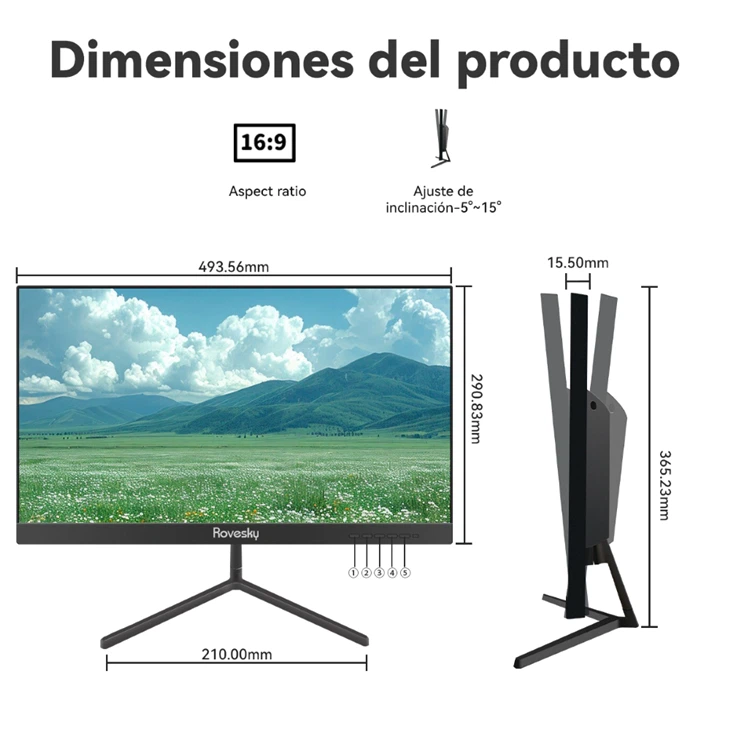
In terms of aspect ratio, regular monitors often have a 16:9 aspect ratio, which is standard for most content. Gaming monitors, on the other hand, may come in different aspect ratios, such as 21:9 (ultrawide). An ultrawide monitor provides a wider field of view, giving you a more immersive gaming experience, especially in games that support it.
Color Accuracy and Gamut
Color accuracy and gamut are important for both gaming and regular use. Regular monitors usually offer decent color accuracy, but they may not cover a wide color gamut. A color gamut refers to the range of colors that a monitor can display.
Gaming monitors often have better color accuracy and cover a wider color gamut, such as sRGB or Adobe RGB. This means that you'll see more vibrant and accurate colors in games, making the gaming experience more immersive. Our gaming monitors are calibrated to provide excellent color accuracy, so you can enjoy the full range of colors in your favorite games.
Input Lag
Input lag is the delay between when you press a button on your controller or keyboard and when the corresponding action appears on the screen. Regular monitors may have a higher input lag, which can be noticeable in games, especially in competitive ones.
Gaming monitors are designed to minimize input lag, ensuring that your actions are reflected on the screen as quickly as possible. This low input lag gives you a more responsive gaming experience, allowing you to react faster to in-game events.
Ergonomics
Ergonomics is another area where gaming monitors shine. Regular monitors may have limited adjustability, making it difficult to find a comfortable viewing position. Gaming monitors, on the other hand, often come with features like height adjustment, tilt, swivel, and pivot. These adjustments allow you to customize the monitor's position to suit your needs, reducing eye strain and neck pain during long gaming sessions.
Price
Of course, all these advanced features come at a price. Gaming monitors are generally more expensive than regular monitors. However, if you're a serious gamer, the investment is worth it. The improved performance and features of a gaming monitor can significantly enhance your gaming experience and give you a competitive edge.
So, there you have it, folks! The main differences between a gaming monitor and a regular monitor. If you're a gamer looking to take your gaming to the next level, a gaming monitor is a must-have. And if you're in the market for a high-quality gaming monitor, look no further. We offer a wide range of gaming monitors, including the Rovesky 27-Inch Flat Gaming Monitor – 240Hz, Rovesky 21.45-Inch Full HD LCD Monitor, and Rovesky 24-Inch IPS Gaming Monitor.
If you're interested in purchasing our gaming monitors or have any questions, feel free to reach out to us for a procurement discussion. We're here to help you find the perfect monitor for your needs.
References
- NVIDIA. (n.d.). G-Sync Technology. Retrieved from NVIDIA official website.
- AMD. (n.d.). FreeSync Technology. Retrieved from AMD official website.
- Various gaming monitor reviews and tech articles for general information on monitor features.