

Television
Your Leading Television Supplier
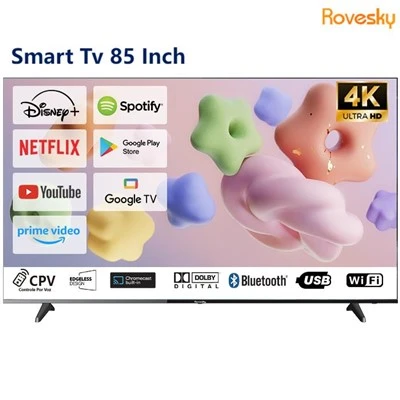
Guangdong R&E Optical Electronic Technology Co., Ltd. is a High Tech enterprise in China. The company offers a variety of Televisions, including 32'', 43'', 55'', 65'', 75'', 85'' Smart Android TV. The fundamental difference between a Smart TV and a Regular TV lies in their level of connectivity and functionality. While regular TVs serve the purpose of conventional television viewing, Smart TVs offer a more comprehensive and connected approach to home entertainment, catering to the modern viewer's desire for on-demand content and interactive experiences. The choice between the two ultimately depends on the user's preferences and the level of interactivity and online content access they desire in their television experience.


Why Choose Us
Advanced Equipment
Our production equipment includes crystal filling machine, cutting machine, CNC engraving machine, fully automatic offset laminating machine, fully automatic binding machine, high-definition differential microscope, fully automatic dispensing machine, laminating machine, product aging furnace, etc.
Quality Assurance
All our products including Monitor, Smart Board, Digital Picture Frame, All-in-one Computer, Stand By Me Tv, Television, Touch Screen, Digital Signage, Lcd Modules, etc. have passed ISO9001, QC080000, ISO14001, ATF16949 certifications.
Production Market
Our company's products are mainly sold to countries and regions such as Europe, North America, the Middle East, Southeast Asia, and Latin America.
Professional Service
We provide one on one exclusive customer service throughout the entire life cycle of pre sales in sales and after sales with 24/7 hour online response and real time answering of customer questions.
Types of Television
Smart TV
A smart TV is an internet enabled TV which connects to your favourite streaming platforms for endless enjoyment of your favourite content. If your TV has internet connectivity, runs on an operating system, and comes with its own app service, it's smart! Smart TVs are very much like smartphones; they stream entertainment straight to your TV via an internet connection. This means that you can watch all the latest films, box sets and play games on your smart TV without the need for an aerial, cable or separate streaming device.
Regular TV
Regular TVs lack internet connectivity and advanced features, relying solely on traditional broadcasting methods like cable or satellite. To access online content or interactive features, users must connect external devices like streaming sticks or gaming consoles. While regular TVs serve the purpose of conventional television viewing, Smart TVs offer a more comprehensive and connected approach to home entertainment, catering to the modern viewer's desire for on-demand content and interactive experiences.
Specifications of Television

Packing List of a Television
|
Bracket x 2 |
Wall mount x 1 |
Remote control x 1 |
Manual x 1 |
|
Bracket screws x 1 pack |
Batteries x 2 |
HD cable x 1 |
Installation Instructions of Television
Unbox and Inspect
Begin by carefully unboxing your smart TV and inspecting its contents. You should find the TV screen, stand/base (if applicable), remote control, power cable, and any included accessories like batteries or manuals. Take note of any special instructions or precautions mentioned in the user manual.
Choose the Right Location
Decide where to place your smart TV. Ensure it's on a stable surface or wall-mounted securely. Consider factors like viewing distance, room lighting, and accessibility to power outlets and internet connectivity.
Connect to Power
Plug in the power cable to an electrical outlet. If your smart TV has a power button, turn it on. Some TVs might power on automatically when plugged in.
Connect to Wi-Fi or Ethernet
For smart features like streaming apps and internet browsing, connect your TV to Wi-Fi or a wired Ethernet connection. Navigate to the settings menu using your remote control, select "Network," and follow the prompts to connect to your home network.
Update Software
Once connected to the internet, check for software updates. Updates often include bug fixes, performance improvements, and new features. Go to the settings menu, select "System" or "Software Update," and follow the instructions to download and install updates.
Configure Picture and Sound Settings
Optimize your viewing experience by adjusting picture and sound settings. Use presets like "Standard," "Movie," or "Sports," or manually adjust settings such as brightness, contrast, color, and sound mode according to your preferences.
Set Up Smart Features
Explore the smart features of your TV. Sign in with your existing accounts or create new ones. Download additional apps from the app store if desired. Activate voice controls if supported by your TV.
Pair External Devices
Connect external devices such as gaming consoles, Blu-ray players, soundbars, or streaming devices to your smart TV using HDMI or other compatible ports. Follow the device-specific instructions for setup.
Enable Parental Controls (Optional)
If you have children, consider setting up parental controls to restrict certain content or limit screen time. Navigate to the settings menu, select "Parental Controls," and follow the prompts to create a PIN and customize settings.
Explore Additional Settings
Take time to explore other settings and features your smart TV offers, such as sleep timer, screen mirroring, voice assistant integration, and more. Refer to the user manual for detailed information about your specific TV model.
Enjoy Your Smart TV!
Once everything is set up to your liking, sit back, relax, and enjoy your new smart TV experience. Stream movies and shows, play games, listen to music, and explore a world of entertainment right from your living room.
Packaging and Shipping


Payment Terms
- T.T with 30% downpayment, 70%before shipment.
- Paypal or West Union also accept.
FAQ
We're professional television manufacturers and suppliers in China, specialized in providing high quality customized service. We warmly welcome you to wholesale discount television in stock here from our factory. Contact us for quotation.
