

How To Send Out Best Wishes? To Your Family Or Friends
Jan 26, 2025

Sharing best wishes with your family and friends is simple and heartfelt with a digital picture frame. This modern device lets you send warm messages and cherished memories in a personal way. Whether it's for special occasions or everyday moments, digital picture frame helps you stay connected and express your love "any where any time" like never before
-
How to send out wishes?
1: Open the Uhale APP on your phone. Tap the 【Gift】 icon
Note: Please Upgrade the APP to Version 3.14 or Above
2: Write down your wishes in text
3: Select a style
4: Choose a frame (s) you would like to send wishes to

-
Personalize Your Digital Picture Frame
(Settings)
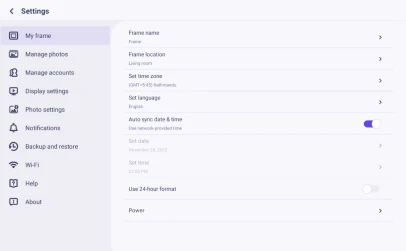
With this setting, you can personalize your digital photo frame according to your needs
My frame
-
Frame Name:
Set/Change the name of the frame. The frame name is also displayed in connected mobile devices, under the list of connected photo frames in the App.
-
Frame location
Set/Change the location of the photo frame. This location is displayed in the list of connected photo frames of your friends and family, helping to identify multiple frames
-
Time zone
Set time zone for a photo frame
-
Language
Set language used for a photo frame
-
Automatic date&time
Use network-provided time
-
Set date/time
The date and time can be manually adjusted after the automatic date&time is turned off
-
Enable/Disable 24-hour clock
Enable and disable the 24-hour clock
-
Power
Click the power icon, you can choose from three options: power off, restart, and sleep
Quick Tips: How To Manage photos, Digital Picture Frame


