

How Smart TVs Connect to WiFi
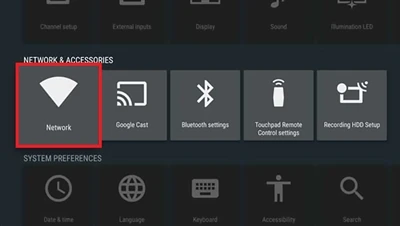
Smart TV make you enjoy streaming web browsing and online content from your TV screen. even you buy an Android Smart TV 3D Smart TV, or LED TV connect it to WiFi is very easy. lets learn simple guide to help you set up your Smart LED TV for seamless connectivity
Steps to Connect Your Smart TV to WiFi⚙️
1. Turn on Your TV: Power on your LED TV and make sure your WiFi router is working
2. Go to Settings: Use your remote to navigate to "Settings" menu on your Smart TV 55 inch TV or any other model.
3. Select Network: Look for the "Network" or "WiFi" option in settings.
4. Choose WiFi Network: list of available WiFi networks will appear. Select your home network.
5. Enter Password: Use your remote or on screen keyboard to enter WiFi password.
6. Connect & Confirm: After enter password confirm connection. Your Liquid Crystal TV LED will now be connected to WiFi
Best Affordable Smart Tvs List For You
Why Connect Smart TV with WiFi?
💡Access Streaming Services: Enjoy apps like YouTube Netflix Prime Video and more.
💡Browse Internet: Use Android Smart TV to visit websites.
💡Update Software: Keep your Smart LED TV up to date for better performance.
💡Enjoy Smart Features: Voice control screen mirroring and online gaming require stable internet connection.
Pro Tips:
Smart TV with LED Pixel technology offer vibrant viewing experience. Check LED TV reviews before buying a 4k smart tv find the best model. like rovesky For latest LED TV deals shop online and upgrade your home entertainment system with ease.
Contact Us
We are leading China manufacturer offer wide range of Smart TVs with latest features at affordable prices. Buy direct from our factory no distributors no middlemen The best quality at the lowest cost. Get latest technology in Smart TVs at unbeatable factory prices. Contact us today


