

What is the best gaming monitor for 1080p gaming?
Hey there, fellow gamers! If you're on the hunt for the best gaming monitor for 1080p gaming, you've come to the right place. I'm a supplier of gaming monitors, and I've got the lowdown on what makes a great 1080p gaming monitor.
Let's start with the basics. 1080p, also known as Full HD, has a resolution of 1920 x 1080 pixels. It's been a popular choice for gaming for a long time, and for good reason. It offers a great balance between image quality and performance, especially when paired with the right hardware.
Refresh Rate
One of the most important factors to consider when choosing a gaming monitor is the refresh rate. This is measured in Hertz (Hz) and refers to how many times per second the monitor updates the image on the screen. A higher refresh rate means smoother motion, which is crucial for fast-paced games.
For 1080p gaming, a refresh rate of at least 144Hz is recommended. This will give you a significant advantage over a standard 60Hz monitor, especially in competitive games like CS:GO, Overwatch, or Fortnite. You'll notice less motion blur and a more responsive feel.
Some of our monitors, like the Rovesky 32-Inch Curved Gaming Monitor – 240Hz, offer an even higher refresh rate of 240Hz. This is overkill for some games, but if you're a serious esports player, it can make a real difference. You'll be able to spot enemies and react faster than ever before.

Response Time
Another important factor is the response time. This is measured in milliseconds (ms) and refers to how quickly the pixels on the monitor can change from one color to another. A lower response time means less ghosting and smearing, especially in fast-moving scenes.
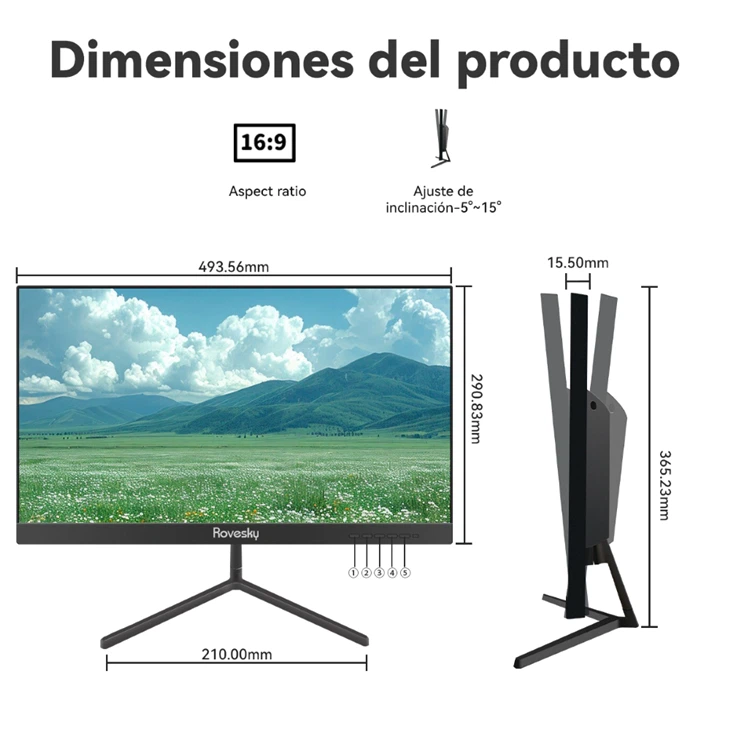
For 1080p gaming, a response time of 1ms or less is ideal. This will ensure that you get the sharpest and clearest images possible. Our Rovesky 21.45-Inch Full HD LCD Monitor has a response time of 1.2ms, which is great for reducing ghosting and providing a smooth gaming experience.
Curvature
Curved monitors have become increasingly popular in recent years, and for good reason. They offer a more immersive gaming experience by wrapping the image around your field of vision. This can make you feel like you're right in the middle of the action.
When it comes to 1080p gaming, a curvature of 1500R or 1800R is a good choice. This will give you a nice curve without being too extreme. Our Rovesky 27-Inch Curved Gaming Monitor has a 1800R curvature, which provides a great balance between immersion and comfort.
Color Accuracy
Color accuracy is also important for gaming, especially if you're into games with rich visuals like RPGs or open-world games. A monitor with good color accuracy will display colors more vividly and realistically.
Look for a monitor with a high sRGB coverage, ideally 99% or more. This will ensure that you get accurate and vibrant colors. Some of our monitors also support HDR (High Dynamic Range), which can further enhance the color and contrast of the images.
Size
The size of the monitor is a personal preference, but for 1080p gaming, a size between 24 and 32 inches is a good range. A smaller monitor will give you a more focused view, while a larger monitor will provide a more immersive experience.
Our 27-inch and 32-inch monitors are popular choices for 1080p gaming. They offer a good balance between size and performance, and they're large enough to enjoy the game without sacrificing too much image quality.
Other Features
In addition to the above factors, there are a few other features that you might want to consider. For example, some monitors come with built-in speakers, which can be convenient if you don't want to use external speakers. Others have adjustable stands, which allow you to tilt, swivel, and height-adjust the monitor for a more comfortable viewing position.
Some monitors also support FreeSync or G-Sync, which are technologies that synchronize the refresh rate of the monitor with the frame rate of the GPU. This can eliminate screen tearing and provide a smoother gaming experience.
Our Recommendations
Based on all of the above factors, here are some of our top recommendations for 1080p gaming monitors:
- Rovesky 32-Inch Curved Gaming Monitor – 240Hz: This monitor offers a high refresh rate of 240Hz, a fast response time of 1ms, and a 1800R curvature. It's perfect for competitive gaming and provides a very immersive experience.
- Rovesky 27-Inch Curved Gaming Monitor: With a 144Hz refresh rate, 1ms response time, and 1800R curvature, this monitor is a great all-around choice for 1080p gaming. It also has good color accuracy and supports FreeSync.
- Rovesky 21.45-Inch Full HD LCD Monitor: If you're on a budget or prefer a smaller monitor, this one is a great option. It has a 60Hz refresh rate and a 1.2ms response time, which is still good for casual gaming.
Conclusion
Choosing the best gaming monitor for 1080p gaming depends on your specific needs and preferences. If you're a competitive gamer, you'll want to focus on a high refresh rate and fast response time. If you're more into immersive games, a curved monitor with good color accuracy might be more your style.
We hope this blog post has helped you understand what to look for in a 1080p gaming monitor. If you're interested in purchasing any of our monitors or have any questions, please don't hesitate to contact us for a procurement discussion. We're here to help you find the perfect monitor for your gaming setup.
References
- Various industry reports on gaming monitor technology and trends.
- User reviews and feedback on gaming monitors.